Getting Started with ASCII Motion
This documentation is currently in active development. If you are seeing this notification, some information may be out of date or incorrect. Please check back soon for more complete content.
Welcome to the ASCII Motion documentation! Review these docs to learn how to create ASCII/ANSI Art and Animations with ASCII Motion.
This guide is currently in development, so if your questions aren't answered here, feel free to reach out on twitter or in our discord.
What is ASCII Motion?
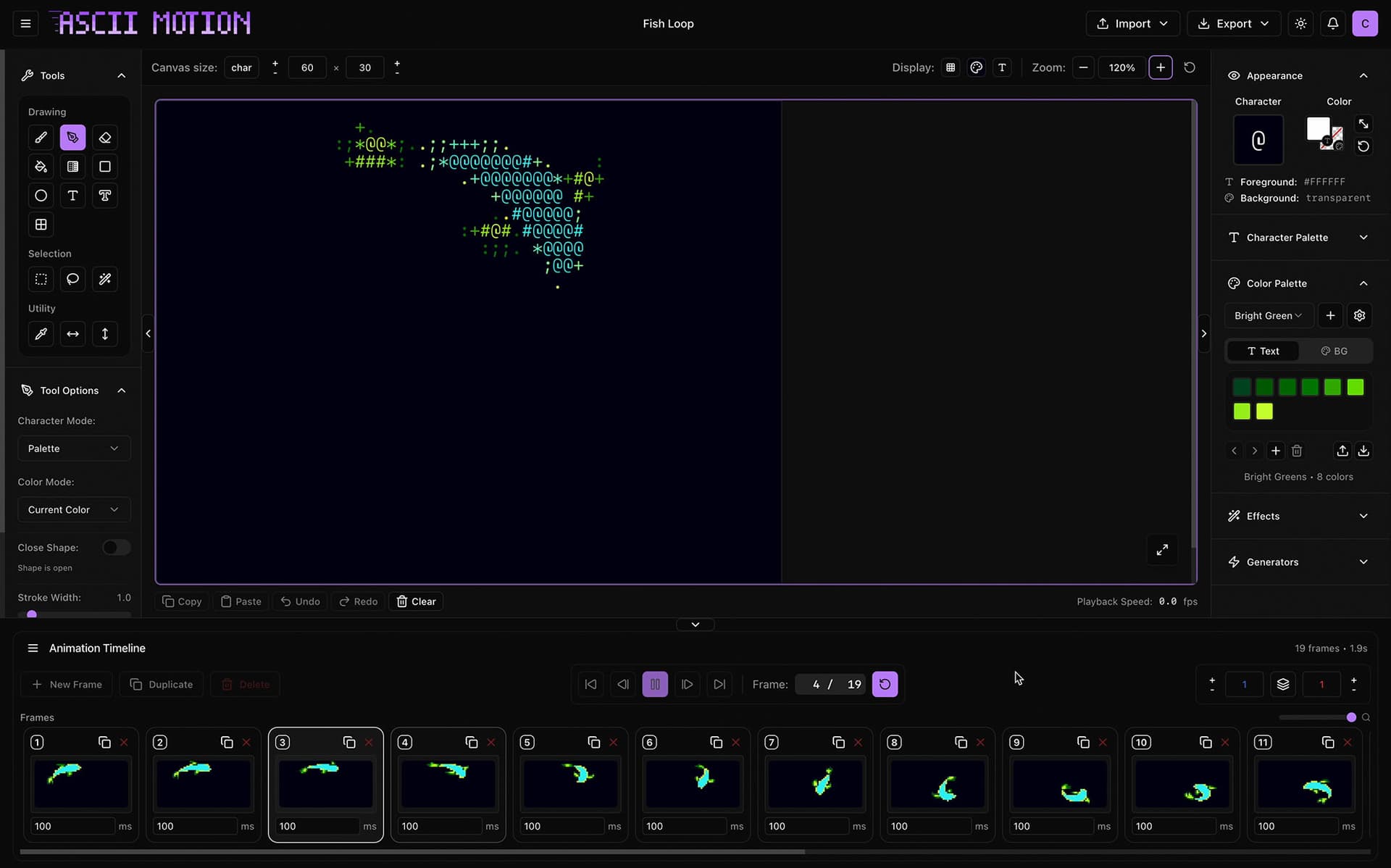
ASCII Motion is a web-based editor for creating animated ASCII art. Built entirely in the browser, it combines the nostalgia of terminal graphics with modern editing capabilities.
Whether you're a digital artist, game developer, creative coder, or just exploring retro aesthetics, ASCII Motion provides all the tools you need to bring your ideas to life.
Why ASCII Motion?
Game Developers - Create retro game sprites, UI elements, and terminal-style interfaces
Digital Artists - Explore pixel art and ASCII art with modern tools
Web Designers - Export into formats for the web like HTML or React components.
Creative Coders - Generate procedural animations and export them into code
Retro Enthusiasts - Recreate classic terminal aesthetics and animations
Key Features
🎨 Full-featured Drawing Tools
- Pencil, line, shapes (rectangle, ellipse) for "drawing" with characters
- Bezier curves for smooth paths and custom fill styles
- Solid and Gradient fill with dithering effects
- Text tool with multiple fonts
- ASCII Font tool using Figlet Fonts
- ASCII Shape drawing tool for auto generating ASCII Box/Line characters
🎬 Animation System
- Layer-based composition with multiple layers
- Content frames with timeline positioning
- Keyframe transforms (position, scale, rotation, anchor point)
- Easing curves (linear, ease in/out, bounce, custom bezier)
- Layer groups with cascading transforms
- Onion skinning for smooth motion
- Configurable frame rate (1–60 FPS)
- Work area for constrained playback
- Pre-computed 60 FPS playback
✨ Visual Effects
- Non-destructive, timeline-based effect blocks
- Keyframeable parameters on all effects
- Per-layer, per-group, and global scoping
- 8 effects: Levels, Hue & Saturation, Remap Colors, Remap Characters, Scatter, Wave Warp, Motion Trails, Wiggle
- Procedural generators (noise, patterns)
🧪 Procedural Animation Generators
- Radio waves
- Turbulent noise
- Particle physics
- Rain drops
- Digital Rain
🎥 Convert videos/images into ASCII
- Convert most video or image formats to ASCII
- Custom color and character palette conversion systems
- Pre-effects that fine tune the video/image input for conversion
- Live preview of conversion as you edit settings
📤 Export Options
- Raster images - High-resolution images with transparency
- Vector images - SVG's compatible with browsers, Figma, and Illustrator
- Video - MP4 and WebM formats
- HTML - Interactive web embeds
- JSON - Shareable and human-readable project files
- React - A drop in canvas component for React apps
- .asciimtn - A propietary format for saving ASCII Motion projects
☁️ Cloud Features
- Save to cloud (3 projects for free accounts, unlimited for Pro tier)
- Access from any device
- Post to the community gallery for free.
How It Works
ASCII Motion uses a grid-based canvas where each cell can contain:
- A character (ASCII or Unicode)
- A foreground color
- A background color
This simple concept enables both traditional ASCII and ANSI art, all with animation capabilities and multiple export styles.
Think of it as a grid of "pixels" like any art app, but instead of color data, it's character, color, and background color data. And the aspect ratio of each grid cel is 0.6 width to height, to allow for monospace fonts.
The animation system uses a layer-based timeline where each layer contains content frames (ASCII canvas data with time ranges) and property tracks for keyframe animation. Multiple layers composite together, with effects applied non-destructively at render time.
System Requirements
ASCII Motion runs entirely in your web browser - no installation required!
Minimum Requirements:
- Modern browser (Chrome 90+, Firefox 88+, Safari 14+)
- 4GB RAM
- WebGL 2.0 support
- Internet connection (for cloud features)
Recommended:
- 8GB+ RAM for complex animations
- 1920×1080 or higher resolution
- Chrome/Edge for best performance
- Fast internet for quick saves
Supported Platforms:
- ✅ Windows 10/11
- ✅ macOS 10.15+
- ✅ Linux (Chrome/Firefox)
- ⚠️ iPad Pro (experimental)
- ❌ Mobile phones (view-only)
Community & Support
Get Help
Documentation - You're here! Browse the sidebar for detailed guides.
Tutorials - Step-by-step projects at /tutorials
GitHub Issues - Hit a bug, or want to request a feature? Open an issue on GitHub.
Social - Send a message on twitter to @ascii_motion
Discord Community - Join to connect with the community, provide feedback, and ask for help. Invite link here.
Share Your Work
- Tag
@ASCII_Motionon Twitter - Post in our Discord showcase channel
- Submit to the community gallery
- Create tutorials for others!
Pricing & Plans
Free Plan
- ✅ All tools and features
- ✅ Limited to 3 saved projects
- ✅ Community support
Premium Plan ($5/month, coming soon)
- ✅ Everything in Free, plus:
- ✅ Unlimited cloud storage
- ✅ Priority support
Next Steps
Choose your next step:
- Brand New? → Installation Guide
- Have an Account? → Create Your First Project
- Want to Explore? → Interface Overview
- Need Inspiration? → Tutorials
Let's start creating! 🎨✨
Continue to Interface walkthrough →